Your training,in the AI youalready use.
Ask ChatGPT, Claude or the assistant in your terminal to log lunch or build tomorrow’s push day. It lands in your app in seconds.
- Free with any JustGains account
- Sign in once, no API key
- Disconnect any time
Log my lunch: chicken burrito bowl with guac and a sparkling water
 JustGains·Log food
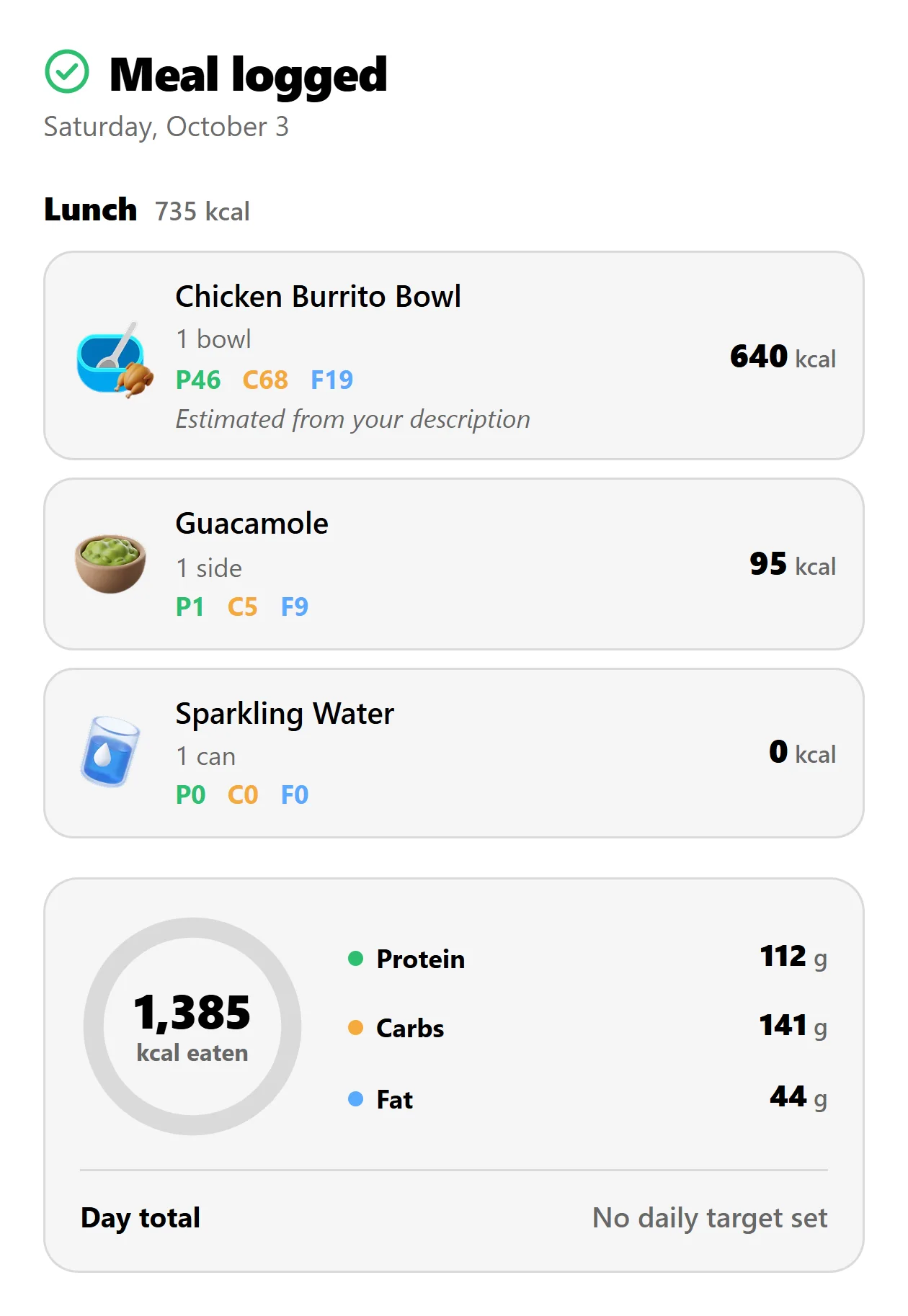
Lunch is in: 735 kcal, and 1,385 for the day so far.
Real requests, and the cards JustGains sends back. Pick an assistant.
Pick your assistant.
All of them get the same 29 tools. Pick yours, then try the line on its card.
 ChatGPTOpenAIIn the ChatGPT Plugins directory. Open Plugins, find JustGains and connect.“Build me a 45-minute dumbbell upper body workout and save it to my account.”Set it up in ChatGPT
 ClaudeAnthropicIn the Claude connector directory. Works on the Free plan, on web, desktop and phone.“Write me a 4-week beginner strength program and enroll me in it.”Set it up in Claude
 Grok BotxAIAdd it as a custom connector today. The marketplace listing is in review.“Which exercises have I trained most often in the last 30 days?”Set it up in Grok Bot
 MuseMetaConnects from the Muse Connectors library, with workout cards inside the chat.“How many days did I train in the last 30 days, and how does that compare with the 30 before?”Set it up in Muse


 Claude Code, Codex, Cursorand VS CodeOne command or one line of config. Sign in once in the browser.“Has my bench press actually stalled? Look at the last two months.”Set it up in your terminal
 ZapierPrivate beta. Accept the invite and it appears in your Zapier.“When I finish a workout, add a row to my training sheet.”Use it with Zapier
 n8nA community node on npm. Install n8n-nodes-justgains from Settings.“Every Monday at 8, send my week’s summary to Slack.”Get the n8n node
 Any MCP clientIn the official MCP Registry. If your tool takes a server address, it works.“What did I lift last week, and which muscles did I barely train?”Connect any assistant
29tools any assistant can call.
- R19 read your training
- W10 save to your account
- 3 work before you have signed in
Workouts
- WGenerate a workoutBuilds a session from a plain request, like “30 minutes, legs, dumbbells”.
- RShow a workoutOpens any workout as a card you can scroll, with every set.
- WSave a workoutSaves a workout you dictate: exercises in order, with sets, reps, weight and RPE.
- WEdit a workoutChanges a workout’s title, notes or exercises.
History and insights
- RYour recent workoutsRecent sessions with dates, duration, volume, sets and reps.
- RYour logged workoutsEvery recorded session in a window, ranked by volume or duration if you ask.
- RYour history on a liftEvery session and your best on one exercise.
- RYour top liftsRanks your exercises by how often, how heavy and how much.
- RYour progressDaily XP, volume, steps and active days for a date range.
- RYour training weekWorkouts, muscle recovery and bodyweight change over a week.
- RCompare your weeksThis week against the one before it.
- RYour streaksStreaks, training days and workouts per week.
- RMuscle recoveryWeekly sets against target for every muscle group.
Food
- WLog foodSaves what you ate and returns the day’s totals. Corrections land on the same entry.
- WRemove foodTakes entries out of your diary and returns the new totals.
- RYour food diaryA day of your diary with totals, targets and recent foods.
- RFind a foodSearches the food catalog and the foods you log most.
Programs
- RFind a programSearches the program catalog, with schedules, ratings and creators.
- RProgram detailsA program’s weeks and days.
- RYour programsThe programs you follow, how far along you are and what comes next.
- WBuild a programSaves a multi-week program written in plain text.
- WStart or finish a programStarts, completes or leaves a program.
Exercises
- RSearch exercisesSearches the exercise library by name, muscle or equipment.
- RExercise detailsInstructions, equipment and muscles worked for one exercise.
Bodyweight
- WLog bodyweightSaves a weigh-in, in pounds or kilograms.
- RYour bodyweightYour weigh-ins, with the current, lowest and highest.
Routes
- WPlan a routePlans a run, ride, walk or hike on real streets and paths, then saves it.
Profile
- RYour profileYour units, timezone and public profile.
- WUpdate your profileChanges profile fields like units, timezone and goals.
Not sure what to ask? Start with one of these.
Four starter prompts ship with the connector, so most assistants list them the moment you connect.
Plan today’s workout
A session built from what you trained this week, what has recovered and where you are in your program.
Review my week
Sessions, muscle volume, streak, bodyweight and food over the last 7 days, against the 7 before.
Why is my lift stuck?
Reads your history on one lift and says whether it has stalled, why, and what to change.
Log what I ate
Saves a meal to your food diary from a plain description and shows the day so far.
Answers come back as cards.
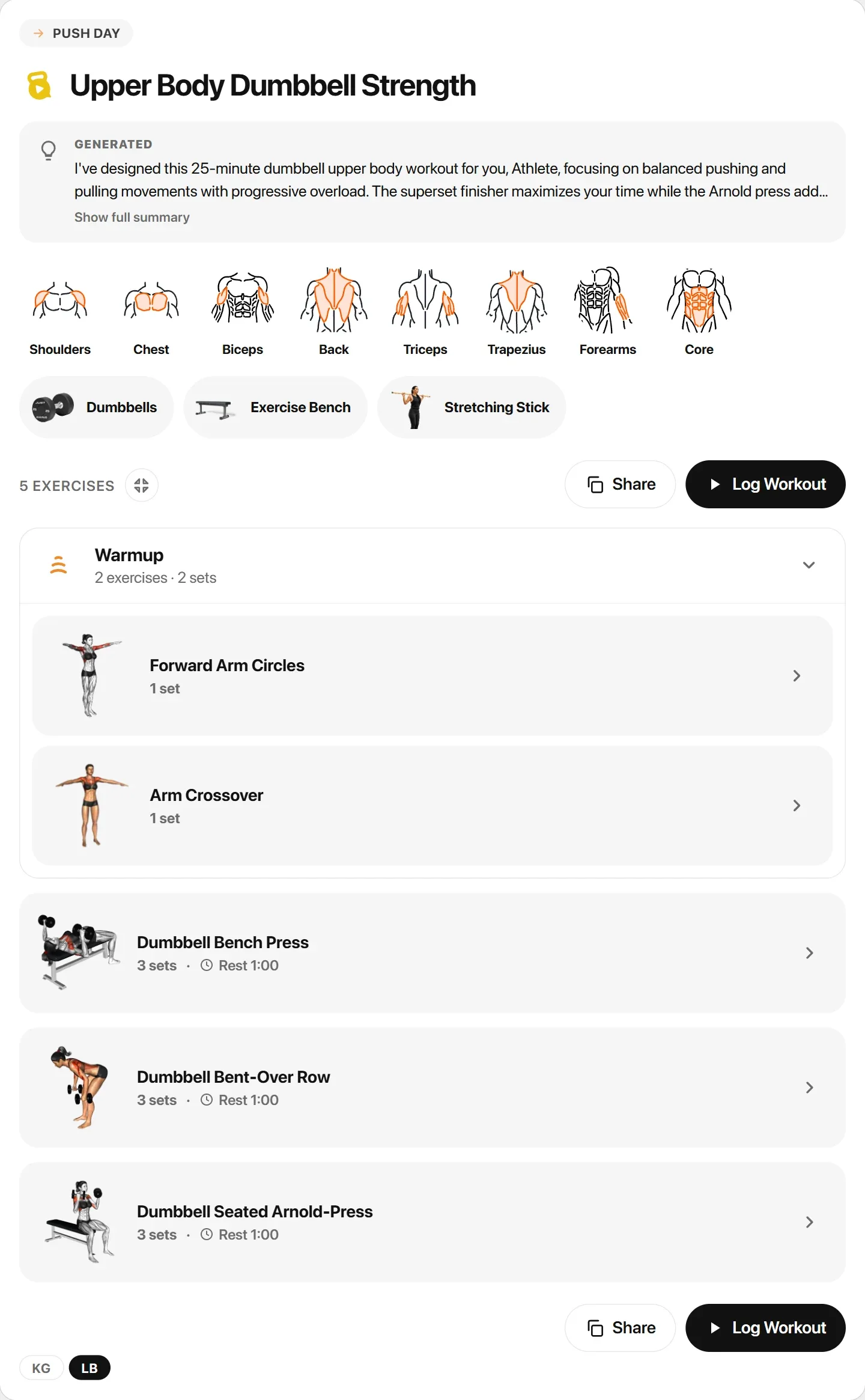
A paragraph about your push day is not a push day, so JustGains answers with the thing itself, in your units.
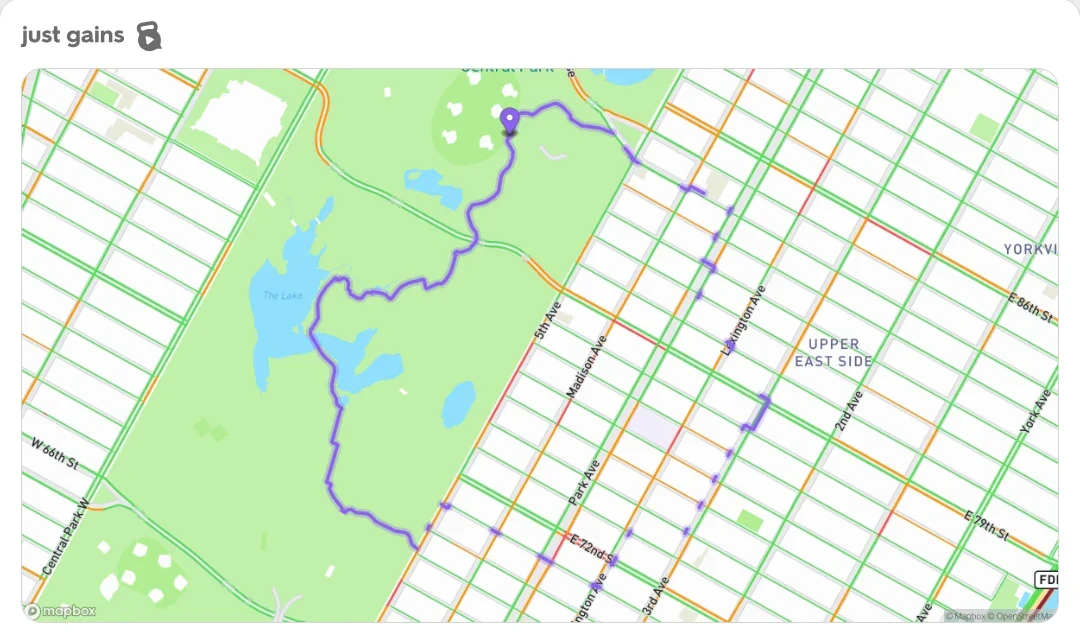
Central Park loop
3.04 mi · running route · loop
Saved to your Routes, ready to follow.
One connector. Every way in.
Each tool is written once, so what one assistant can do, the rest can too.
Your assistant
You ask in plain words. It decides which tool fits.
Four doors
/mcpChatGPT and Claude/connect/mcpCoding tools and MCP directories/grok/mcpGrok Bot/mcp/tools/{name}Muse, n8n and your own scripts
One sign-in
OAuth 2.1 with PKCE, in your browser. Nothing to copy and no secret to leak. Three permissions: workouts, progress and profile.
Your account
The same API the app uses, so a workout an assistant saves is a real workout. Saving twice is safe.
Your phone
Seconds.
Your devices are told something changed, and they fetch it.
You stay in charge of it.
What an assistant gets, and how you take it back.
- You sign in, it never sees a password
- Connecting opens the JustGains sign-in in your browser. The assistant gets a key scoped to workouts, progress and profile.
- Every action has a plain name
- Log food. Save a workout. Plan a route. That is what your assistant shows when it asks to run one.
- Each connection is a device you can end
- ChatGPT, Claude and the rest appear in your account settings by name. End one and only that one is signed out.
- A retry never logs lunch twice
- Saving the same meal again lands on the same entry, and a correction replaces the one it corrects.
Or skip the chat entirely.
Run JustGains on a schedule, from a webhook, or when something happens in another app.
Zapier
7 triggers, 4 actions and 2 searches. Finished workouts, runs, meals, weigh-ins and goals go out; food, water, weight and activities come in.
Your training log in a sheet
- JustGainsWorkout Completed
- Google SheetsAdd a row, volume in lb
Tell the group chat
- JustGainsGoal Completed
- DiscordSend a message
Log meals from a form
- Google FormsNew response
- JustGainsLog Food
n8n
29 operations, one for each tool. Run them on a schedule, from a webhook, or hand them to an n8n AI Agent.
Weekly recap
- ScheduleMonday, 8:00
- JustGainsGet Week Summary
- SlackSend a message
Smart scale weigh-ins
- WebhookFrom your scale
- JustGainsBodyweight: Log
Meals from a group chat
- TelegramNew message
- AI AgentJustGains as a tool
- JustGainsFood: Log
And there is AI inside the app.
Everything above is JustGains reaching out. This is what is already in your pocket.

MalYour training buddy, in chat and on the mic
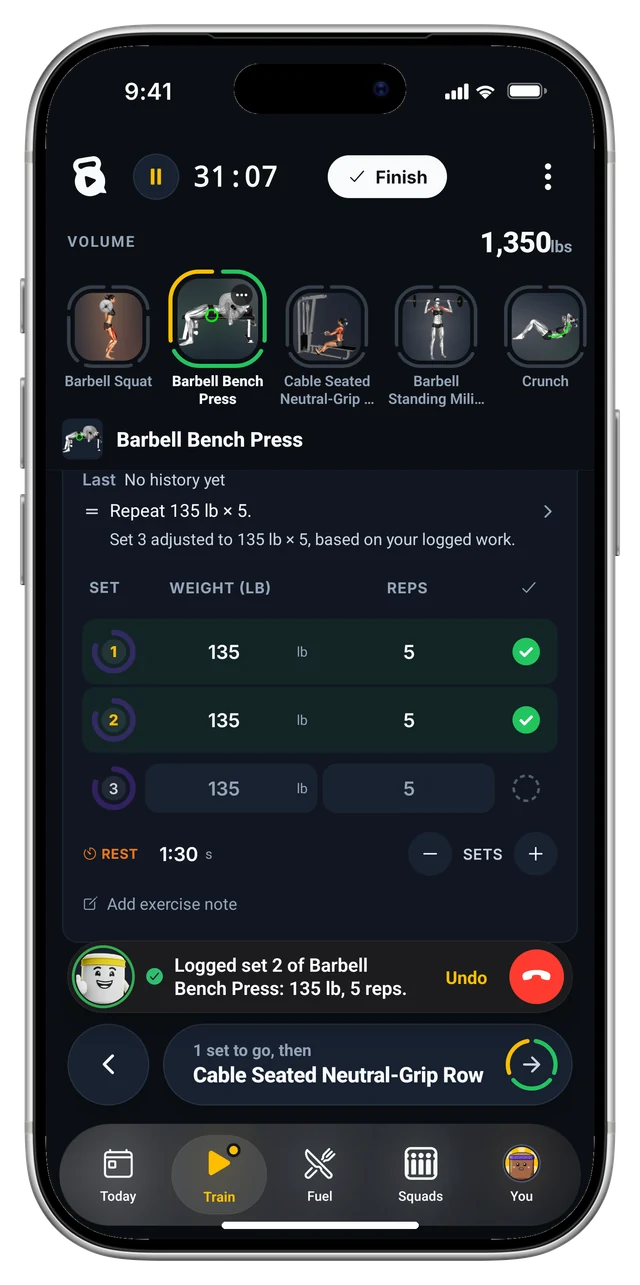
Mal, in your inbox
Text Mal what you ate or what you want to train. He logs the food, ticks the goal or builds the workout.
Meet MalOne mic for the whole app
Say “225 for 8, then rest two minutes” between sets. It keeps working when the signal drops.
Type a meal, get its parts
“Three egg omelet with cheese” becomes eggs, cheddar and cooking fat, read on your phone with no signal needed.
How food logging worksSnap the plate
Photos of a meal come back as foods, portions and macros you can correct before they are saved.
Log food and macrosA body scan from your photos
A physique score, body fat with an honest range, and a map of which muscles lead and which lag.
Get your body scanPush-ups that count themselves
Put the phone under your chest and Auto Counter counts full reps. No video leaves the phone.
How Auto Counter worksBring a program in any shape
Paste a video link, a spreadsheet or a screenshot of your old routine, then approve each exercise match.
Import a programA first draft for coaches
Generate with Mal drafts a plan from what a client told you. Nothing is assigned until you say so.
Generate with Mal
Where the AI stops.
A language model reads a sentence well and guesses your bench badly. So the numbers are not its job.
- Your next weight
- Forge works your loads out from your own logged sets. An assistant picks the exercises; the numbers on the bar come from the engine.Meet Forge
- What to train today
- The chips that suggest what to train next are rules over your recent workouts. Same inputs, same answer, every time.How suggestions work
- Streaks, XP and records
- Counted, never estimated. A PR is a PR because the set is in your log.How streaks work
It knows your runs and your sleep, too.
An assistant answers from what is in your history. These fill it in for you.
- Apple HealthSteps, weight and heart rate come in. Workouts, runs and meals go back out.
- Health ConnectThe same two-way sync on Android.
- Garmin Connect™Runs, rides, sleep and recovery in. Workouts and routes out to your watch. Garmin guide
- StravaConnect it once and the runs and rides you record there land on their own.
- Apple WatchSets, rest timer and phone-free runs from the JustGains watch app.
Where it is listed.
Where a listing is still in review, the guide gets you connected today.
- Official MCP RegistryListed
- ChatGPT Plugins directoryGuideListed
- Claude connector directoryGuideListed
- GlamaListed
- npm (the n8n node)Published
- xAI plugin marketplaceGuideIn review
Build on it.
The same tools over MCP or plain REST, with an OpenAPI file. For your own scripts, make a personal API key in your settings on the web.
Claude Code
claude mcp add --transport http justgains https://justgains.com/connect/mcpCodex
codex mcp add justgains --url https://justgains.com/connect/mcpThe live tool catalog
curl https://justgains.com/mcp/toolsOpenAPI 3.1
curl https://justgains.com/mcp/openapi.json- JustGains/justgains-connectorThe connector package and a local server for clients that want one.
- JustGains/n8n-nodes-justgainsThe n8n community node.
The guide for yours.
- Use JustGains inside ChatGPTAdd it from ChatGPT Plugins, then log food and build workouts in the chat.Read
- Use JustGains inside ClaudeTwo clicks from the directory, on any Claude plan.Read
- Use JustGains in Grok BotSaved workouts, training history and meals, from Grok Bot.Read
- Use JustGains inside MuseWorkout cards in the chat, from the Muse Connectors library.Read
- Connect JustGains to any AI assistantClaude Code, Codex, Cursor, VS Code and anything else that speaks MCP.Read
- Log nutrition with an AI agent or MCPMeals, calories and macros by description, with corrections.Read
- Use JustGains with ZapierSend workouts, runs and meals to the apps you already use.Read
- Use JustGains with GarminYour watch’s runs, sleep and recovery, beside your lifting.Read
Before you connect it.
What people ask before they let a chatbot near their training log.
Ask for a workout. Then go lift it.
Connect the assistant you already have open. Your first request can be the one you were about to type anyway.