Things to know before making a fitness app
A workout app looks like exercises and a rest timer. Then come unit conversions, gyms with no signal, GPS that climbs skyscrapers and a banana with six calorie counts. Here’s what building one takes.
Every developer who lifts has had the thought. You’re resting between sets, poking at a workout app that buried the rest timer three taps deep, and you think: I could build this in a weekend. Exercises, sets, reps, a timer, a chart that goes up. How hard can it be?
We had that thought too, and then we spent years finding out. This is the list we wish someone had handed us on day one. It isn’t meant to talk you out of building a fitness app. It’s meant to show you where the floor drops away, so you can decide with your eyes open.

The weekend version is real, and it’s a trap
You can build a working logger in a weekend. A list of exercises, a screen to add sets, local storage, a history page. It will work for you, on your phone, with the four exercises you do.
The trouble starts when a second person opens it. They train differently, they use different words for the same lift, they lift in kilograms, they lose signal in the gym, they switch phones, they expect last year’s numbers to still be there. None of those needs looks like a feature. Users never ask for them. They only notice when one breaks, and they notice in the review section.
The exercise list is a swamp
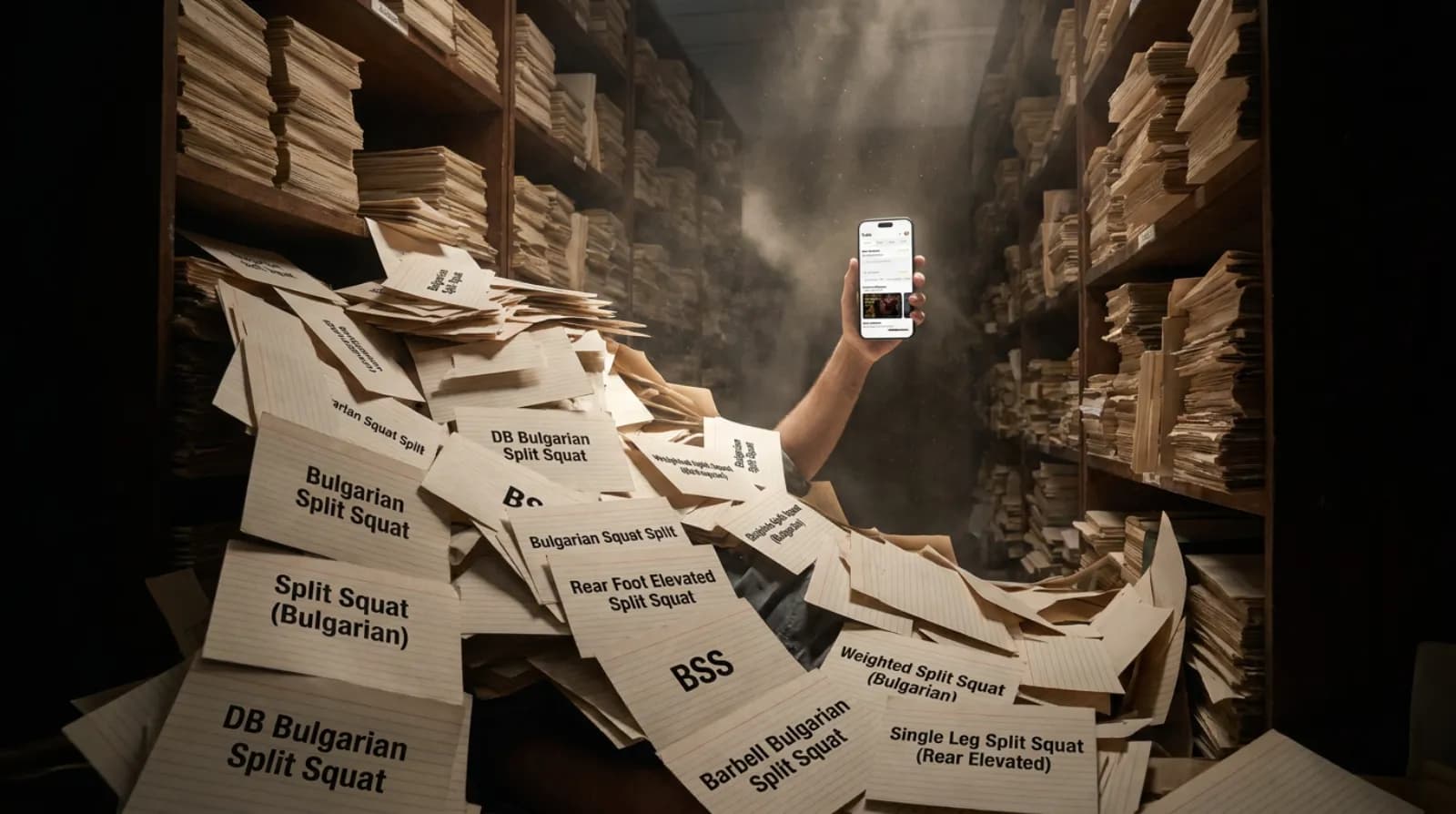
Start with what looks like the easiest table in the app. A Bulgarian split squat is also a "split squat (Bulgarian)", a "DB Bulgarian split squat", a "rear foot elevated split squat" and, to a certain kind of lifter, just "BSS". Your users will type all of them. People importing their history from another app bring that app’s names too, spelled that app’s way.
So the exercise library needs aliases, search that forgives typos, and a way to merge two entries that turn out to be the same movement. Merging is where it gets nasty, because years of logged sets point at the old entry, and every one of them has to follow it to the new one without a single PR going missing. Then each exercise wants muscles, equipment, a flag for whether it’s done one side at a time, and a video that shows the movement. That’s before anyone asks for cable attachments.
A set is not three numbers
The weekend schema says a set is weight, reps and maybe a checkbox. Real training disagrees on day two.
- A weighted pull-up is your bodyweight plus 25 lb. An assisted pull-up is your bodyweight minus whatever the machine takes off.
- A plank is a time. A farmer’s carry is a distance. A sled push is both.
- Single-arm rows are logged per side, and half your users will log both sides in one set anyway.
- Warm-ups, drop sets, supersets and AMRAP sets all count differently toward volume.
- Some people rate effort as RPE, some as reps in reserve, and some refuse to rate it at all.
Every one of those breaks something downstream. Volume charts double-count. Personal records fire on warm-up sets. The estimated one-rep max jumps to a heroic number after a set of 20, because rep-based 1RM formulas were never meant for sets that long. You end up writing rules for which sets are allowed to count for what, and those rules quietly turn into the most important code in the app.
Pounds, kilograms and the 0.1 that ruins your week
You’ll store weights in one unit, because storing both leads to madness. Say it’s kilograms. A lifter in Ohio benches 225 lb, which is 102.058 kg. Round that to 102.1 to keep the database tidy, convert it back for display, and the app proudly reports 225.09 lb. The lifter did not bench 225.09 lb. The lifter would like to know why the app thinks so, and will tell you in an email with three exclamation marks.
Then there are plates. A pound gym jumps in 5 lb steps on a 45 lb bar. A kilogram gym jumps in 2.5 kg steps on a 20 kg bar. Progression suggestions, warm-up ladders and the plate calculator all need to know which gym the person is standing in, or they’ll suggest loads nobody can put on a bar. Distances go through the same wringer: miles and kilometers, pace per mile and pace per kilometer, feet and meters of climbing.
The gym has no signal
Gyms love basements. Basements love concrete. Your app needs to log a whole session with no connection at all, and that means a local database on the phone, a queue of changes waiting to go out, and retries that never send the same set twice. Losing a set gets you a one-star review. Duplicating one gets you a different one-star review.
It gets harder when the same person owns a phone, a watch and a laptop. They start a workout on the watch, fix a typo on the phone, and open the laptop later to plan tomorrow. Three devices edited the same workout, at different times, some of them offline. Which version wins? Deciding that, for every kind of data you store, is a design problem you don’t get to skip.

Timers that keep counting when the phone goes to sleep
A rest timer is about four lines of code until the lifter locks their phone, which is the very first thing they do. iOS and Android both pause or kill apps in the background to save battery, so the timer has to live somewhere the operating system respects: a scheduled notification, a Live Activity on the iPhone lock screen, a foreground service on Android, a buzz on the wrist. Each platform does it differently, and each major OS update moves the goalposts a little.
GPS lies, beautifully
Running looks like the easy part, since the phone already knows where it is. It sort of does. Between tall buildings the signal bounces off glass and the recorded route wanders through offices. In a tunnel it disappears, then jumps when it comes back. Standing at a crosswalk, the point jitters and the app decides you’re still running at a very relaxed pace. Raw elevation data can make a flat river path look like a mountain stage.
So you filter points, smooth elevation, detect pauses, and keep recording with the screen off without draining the battery by lunch. Background location permission gets extra scrutiny from both app stores. And once people can share runs, you discover that every run starts and ends at the same spot, which is usually their front door. Privacy zones that trim the ends of shared routes stop being a nice extra and become something you can’t launch without.

Food is the hardest database in the world
If you add nutrition, you inherit the internet’s argument about bananas. A medium banana, a large banana, a banana per 100 grams, a banana somebody typed in with a decimal point in the wrong place. Branded foods change recipes, carry different labels in different countries and share barcodes across sizes. "One cup" of rice means something different cooked and dry. Homemade recipes need a cooked weight before a portion means anything.
People log food three or more times a day, every day, often with one hand while the other holds the food. Every extra tap is felt. Search has to put the right banana first, the barcode scanner has to work in bad kitchen light, and the totals have to line up with the label on the packet or trust is gone.

Health data comes with paperwork
People expect their workouts to show up in Apple Health or Health Connect, and their steps and heart rate to flow back. The two platforms model the same data differently, ask for permission one data type at a time, and let people revoke any of it whenever they like. App reviewers want to know why you need each permission, and Google Play asks for health declarations on top. A watch app is a whole separate app with its own screen sizes, its own battery budget and its own release process.
Streaks, time zones and the midnight workout
Someone starts a workout at 11:40 pm and finishes at 12:30 am. Which day did they train? Someone else logs a session in Los Angeles, flies to London and opens the app eight hours "later" the same evening. Did their streak just break? Daylight saving time adds an hour that doesn’t exist once a year and repeats one in the fall.
This sounds like trivia until you remember how much people care about streaks. A wrongly broken streak isn’t a bug report. It’s a person who feels robbed, and they’re right.
Then people actually show up
Everything above was about getting one person’s data right. Scale is the part where you get it right for everyone at the same time, and it brings its own list.
- Queries that ran instantly on your friends’ data crawl when the history table holds years of everybody’s sets.
- A feed means every new workout has to reach every follower, quickly, without sending a push notification twice because a phone registered itself twice.
- Photos, videos and route maps pile up in storage, and each one needs a thumbnail, a size limit and a cost you didn’t budget for.
- Subscriptions arrive from the App Store, Google Play and the web, each with its own refunds, renewals and restore-purchase button that someone will press at 2 am.
- Every release goes through two app store reviews, and a fix to native code can’t ship until a new build is approved and installed.
- Support email arrives. It’s mostly kind. It’s also endless, and every reply teaches you about a gym, a phone or a training style you never planned for.

Why it takes so long to make it good
Look back over that list and notice what’s missing: the screens. The screens were the weekend. What takes years is the thousand small decisions underneath them, each made correctly for people you’ll never meet, in units you don’t use, in gyms you’ll never visit. No single fix is impressive. A set that syncs, a timer that buzzes, a route that stays on the road, a banana with one calorie count. Together they’re the difference between an app people try and an app people keep for five years of training.
That care doesn’t show up in a demo. It shows up the morning someone opens the app after a month off and every number is exactly where they left it.
That’s why we built JustGains
We kept running into every item on this list, in other apps and in our own. So we built one app that takes them seriously. JustGains logs strength training offline and syncs it across your phone, watch and the web. It speaks pounds and kilograms, records runs with privacy zones, logs food, builds workouts from your equipment and history, and counts your streak by your own local day, so a late session stays on the day you trained. Coaches can run their clients from it, and you can import your history from the app you’re using now.
Thinking of building a fitness app? Start with JustGains
JustGains is free. If you were about to spend your weekends building a workout tracker for yourself, use JustGains for a month first. Most of the hard parts above are already solved, and you’ll find out quickly whether the thing you wanted to build is a whole app or one missing feature. If it’s a feature, tell us. That’s how a lot of JustGains got made.
If you’re a coach, the coaching panel gives you clients, plans and check-ins without building a back office. If you make programs, publish them as a creator. If you want to wire your training into your own tools, JustGains already talks to Claude, ChatGPT and Zapier.
And if you still want to build your own fitness app after all this, good. Go in knowing where the cliffs are, keep a fire extinguisher by the servers, and log your sets in JustGains while you build it.
Common questions
How long does it take to build a fitness app?
A basic workout logger that works on your own phone takes weeks. An app strangers trust with years of training history, one that syncs across phone, watch and web, works offline, tracks runs and food and survives app store review, takes years of steady fixes. The first version is the short part.
What is the hardest part of making a fitness app?
The data. Exercise names that mean the same movement, food entries that disagree, sets logged offline on two devices at once, GPS points that drift. Screens are quick to draw. Making the numbers underneath them correct for every user, in every unit, in every time zone, is where the time goes.
Do I need a backend for a workout app?
Only if people expect their history to follow them. The moment someone logs in on a second device, shares a workout or gets a new phone, you need accounts, a server and a sync design that handles conflicts. Many first apps skip this and then rebuild around it.
Is JustGains free?
JustGains is free to download. Training in the app requires a membership, with base access available through a gym signup. If you were about to build a fitness app for yourself, start with JustGains and see what you would still want to add.
Can I build on top of JustGains instead of starting from scratch?
Coaches can run clients from the coaching panel, creators can publish programs, and you can talk to your training data from Claude, ChatGPT or Zapier. If what you wanted was your own workflow, that may be most of it.
Keep reading
The natural next steps from this guide.
How workout suggestions work
JustGains workout suggestions are deterministic, rule-based prompts from your recent training.
What is an estimated 1RM?
An estimated 1RM predicts your max from a completed set without requiring a true max attempt.
How streaks work
JustGains streaks count distinct local workout days, with rest tolerance and Streak Freezes.
The plate calculator: load a barbell without the math
The JustGains plate calculator shows exactly what to load per side while you log, plus the plate math behind it: bar weights, "two plates", and single-stack machines.
JustGains vs Fitbod
I pulled Fitbod’s workout generator out of the shipped app to see what actually decides your session, then did the same to Gravl. Three engines, three philosophies, and an honest comparison with how JustGains answers the same question.